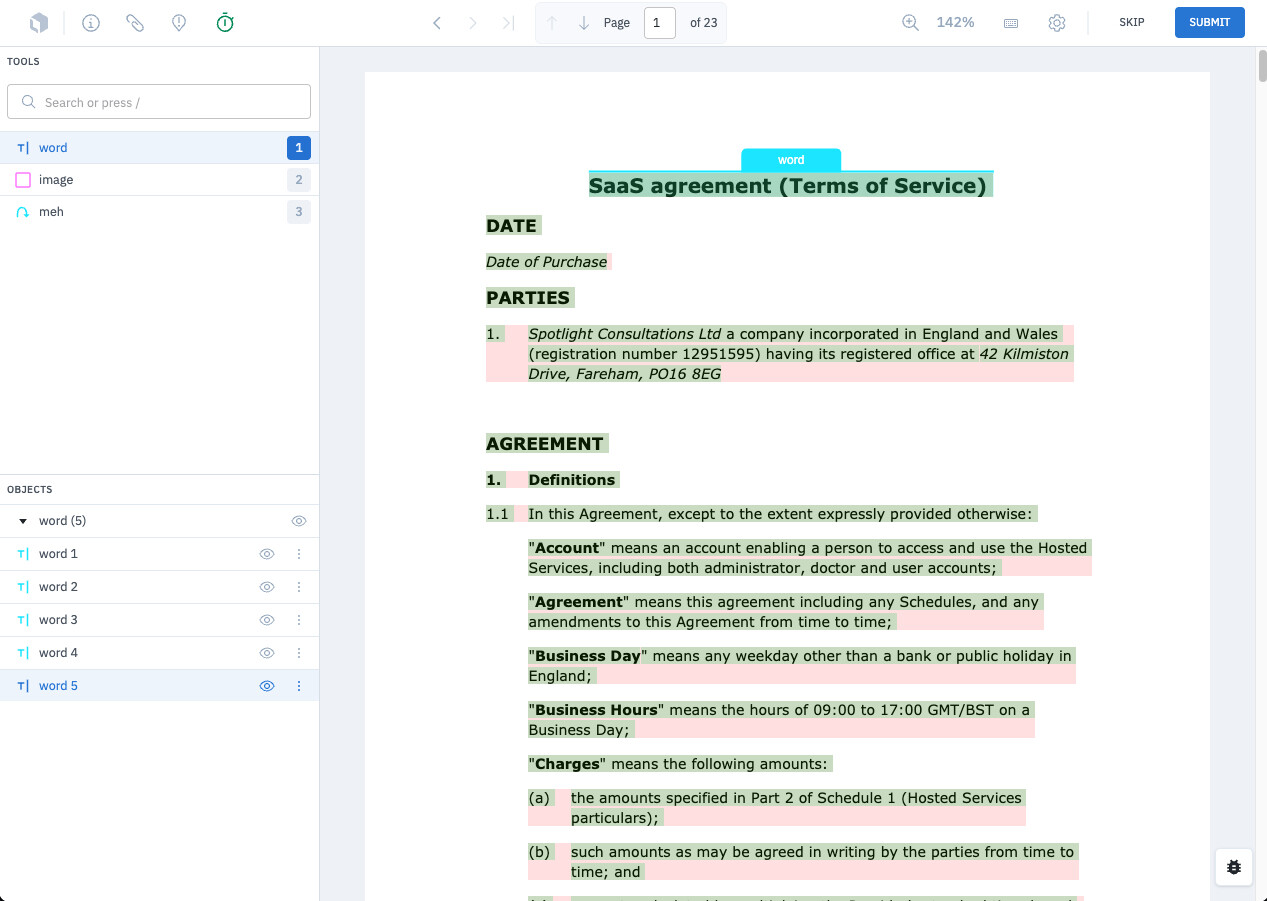
Model are great at doing OCR and provided flexibility into layer generation for Labelbox enabling your team to refine the requirements for a specific Named-entity recognition (NER) capture.
Here is a flexible script that you can use with PyMuPDF lib in conjunction or stand alone with Mistral OCR model.
In conjunction with our out of the box auto OCR capabilities Documents - Labelbox we offer the best in class document processing while maximising the level of customization.
What is required:
- A PDF file
- A Labelbox account
- Mistral API key (optional)
Script
"""
Mistral OCR PDF Parser

This script processes PDF files using Mistral AI's OCR capabilities and outputs
the results in Labelbox's text layer validation schema format.

Usage:
    python mistral_ocr_parser.py <pdf_path> [--output <output_path>]
    # With validation to check if the output is valid
    python mistral_ocr_parser.py your_document.pdf --validate
    #no mistral, just pymupdf
    python mistral_ocr_parser.py document.pdf --no-mistral --validate

Environment Variables:
    MISTRAL_API_KEY: Your Mistral AI API key
"""

import os
import json
import argparse
import base64
import uuid
from typing import List, Dict, Any, Optional
from pathlib import Path

import fitz  # PyMuPDF
from mistralai import Mistral
from dotenv import load_dotenv
import requests

# Load environment variables
load_dotenv()


class MistralOCRParser:
    """Parser that combines Mistral OCR with coordinate extraction for Labelbox format."""

    def __init__(self, api_key: Optional[str] = None):
        """Initialize the parser with Mistral API key."""
        self.api_key = "" or os.getenv("MISTRAL_API_KEY")
        if not self.api_key:
            raise ValueError("MISTRAL_API_KEY environment variable is required")

        self.mistral_client = Mistral(api_key=self.api_key)

    def encode_pdf_to_base64(self, pdf_path: str) -> str:
        """Encode PDF file to base64 string."""
        with open(pdf_path, "rb") as pdf_file:
            return base64.b64encode(pdf_file.read()).decode('utf-8')

    def extract_text_with_coordinates(self, pdf_path: str) -> List[Dict[str, Any]]:
        """Extract text with coordinates using PyMuPDF."""
        doc = fitz.open(pdf_path)
        pages_data = []

        for page_num in range(len(doc)):
            page = doc.load_page(page_num)

            # Get page dimensions
            page_rect = page.rect
            width = page_rect.width
            height = page_rect.height

            # Extract text blocks with coordinates
            blocks = page.get_text("dict")
            groups = []

            for block_idx, block in enumerate(blocks["blocks"]):
                if "lines" in block:  # Text block
                    block_text = ""
                    tokens = []

                    for line in block["lines"]:
                        for span in line["spans"]:
                            text = span["text"].strip()
                            if text:
                                block_text += text + " "

                                # Create token with coordinates in POINTS
                                bbox = span["bbox"]
                                token = {
                                    "id": str(uuid.uuid4()),
                                    "content": text,
                                    "geometry": {
                                        "left": bbox[0],
                                        "top": bbox[1],
                                        "width": bbox[2] - bbox[0],
                                        "height": bbox[3] - bbox[1]
                                    }
                                }
                                tokens.append(token)

                    if block_text.strip():
                        # Create group with block-level coordinates
                        block_bbox = block["bbox"]
                        group = {
                            "id": str(uuid.uuid4()),
                            "content": block_text.strip(),
                            "geometry": {
                                "left": block_bbox[0],
                                "top": block_bbox[1],
                                "width": block_bbox[2] - block_bbox[0],
                                "height": block_bbox[3] - block_bbox[1]
                            },
                            "tokens": tokens
                        }
                        groups.append(group)

            page_data = {
                "width": width,
                "height": height,
                "number": page_num + 1,
                "units": "POINTS",
                "groups": groups
            }
            pages_data.append(page_data)

        doc.close()
        return pages_data

    def process_with_mistral_ocr(self, pdf_path: str) -> Optional[Dict[str, Any]]:
        """Process PDF with Mistral's dedicated OCR API."""
        try:
            print("Processing with Mistral OCR (dedicated model)...")

            # STAGE 1: Upload the PDF file to Mistral
            print("Stage 1: Uploading PDF to Mistral...")
            try:
                # Use the correct format for file upload
                from pathlib import Path
                file_name = Path(pdf_path).name

                with open(pdf_path, 'rb') as pdf_file:
                    # Create the file object in the expected format
                    files = {
                        'file': (file_name, pdf_file, 'application/pdf'),
                        'purpose': (None, 'ocr')
                    }

                    # Make direct API call if SDK doesn't work
                    import requests
                    headers = {
                        'Authorization': f'Bearer {self.api_key}'
                    }

                    upload_response = requests.post(
                        'https://api.mistral.ai/v1/files',
                        headers=headers,
                        files=files
                    )

                    if upload_response.status_code == 200:
                        response_data = upload_response.json()
                        file_id = response_data.get('id')
                        if file_id:
                            print(f"File uploaded successfully, file_id: {file_id}")
                        else:
                            print(f" Upload response missing file_id: {response_data}")
                            file_id = None
                    else:
                        print(f" Upload failed with status {upload_response.status_code}: {upload_response.text}")
                        file_id = None

                if file_id:
                    # STAGE 2: Process with OCR using the file_id
                    print("🔍 Stage 2: Processing with Mistral OCR...")
                    try:
                        # Make direct API call for OCR
                        ocr_payload = {
                            "model": "mistral-ocr-latest",
                            "document": {
                                "type": "file",
                                "file_id": file_id
                            }
                        }

                        ocr_response = requests.post(
                            'https://api.mistral.ai/v1/ocr',
                            headers=headers,
                            json=ocr_payload
                        )

                        if ocr_response.status_code == 200:
                            ocr_data = ocr_response.json()
                            print(f"Mistral OCR processed successfully")

                            # Clean up: delete the uploaded file
                            try:
                                delete_response = requests.delete(
                                    f'https://api.mistral.ai/v1/files/{file_id}',
                                    headers=headers
                                )
                                if delete_response.status_code == 200:
                                    print(f"Cleaned up uploaded file")
                            except Exception as cleanup_error:
                                print(f" Could not clean up file: {cleanup_error}")

                            return {
                                "extracted_data": ocr_data,
                                "method": "dedicated_ocr_2stage",
                                "usage_info": ocr_data.get('usage_info', None)
                            }
                        else:
                            print(f" OCR failed with status {ocr_response.status_code}: {ocr_response.text}")

                    except Exception as ocr_error:
                        print(f"Stage 2 (OCR) failed: {ocr_error}")
                        # Try to clean up file
                        try:
                            requests.delete(f'https://api.mistral.ai/v1/files/{file_id}', headers=headers)
                        except:
                            pass
                else:
                    print("Failed to upload file to Mistral")

            except Exception as upload_error:
                print(f"Stage 1 (Upload) failed: {upload_error}")
                pass

            # No fallback to vision model since it doesn't accept PDFs
            print("Mistral OCR not available, will use PyMuPDF only")
            return None

        except Exception as e:
            print(f"Error processing with Mistral OCR: {e}")
            print("Falling back to PyMuPDF for coordinate extraction")
            return None

    def enhance_with_mistral(self, pages_data: List[Dict[str, Any]], pdf_path: str) -> List[Dict[str, Any]]:
        """Enhance coordinate-extracted data with Mistral OCR if available."""
        # Try to get Mistral OCR results
        mistral_result = self.process_with_mistral_ocr(pdf_path)

        if mistral_result:
            print("Enhancing PyMuPDF results with Mistral OCR text...")
            # Here you could implement logic to improve text accuracy using Mistral's extraction
            # For now, we'll keep the coordinate data from PyMuPDF and note the Mistral enhancement

            # You could potentially use Mistral's text to correct OCR errors in the PyMuPDF extraction
            # or use it as a quality check

            if mistral_result.get('usage_info'):
                print(f"Mistral API Usage: {mistral_result['usage_info']}")

        return pages_data

    def parse_pdf(self, pdf_path: str) -> List[Dict[str, Any]]:
        """Main method to parse PDF and return Labelbox-formatted data."""
        if not os.path.exists(pdf_path):
            raise FileNotFoundError(f"PDF file not found: {pdf_path}")

        print(f"Processing PDF: {pdf_path}")

        # Extract text with coordinates using PyMuPDF
        pages_data = self.extract_text_with_coordinates(pdf_path)

        # Enhance with Mistral OCR if available
        enhanced_data = self.enhance_with_mistral(pages_data, pdf_path)

        return enhanced_data

    def validate_schema(self, data: List[Dict[str, Any]]) -> bool:
        """Validate the output against Labelbox schema requirements."""
        try:
            for page in data:
                # Check required page fields
                required_page_fields = ["number", "units", "groups"]
                for field in required_page_fields:
                    if field not in page:
                        print(f"Missing required page field: {field}")
                        return False

                # Check groups
                for group in page["groups"]:
                    required_group_fields = ["id", "content", "geometry", "tokens"]
                    for field in required_group_fields:
                        if field not in group:
                            print(f"Missing required group field: {field}")
                            return False

                    # Check geometry
                    required_geometry_fields = ["left", "top", "width", "height"]
                    for field in required_geometry_fields:
                        if field not in group["geometry"]:
                            print(f"Missing required geometry field: {field}")
                            return False

                    # Check tokens
                    for token in group["tokens"]:
                        required_token_fields = ["id", "geometry", "content"]
                        for field in required_token_fields:
                            if field not in token:
                                print(f"Missing required token field: {field}")
                                return False

            print("Schema validation passed")
            return True

        except Exception as e:
            print(f"Schema validation error: {e}")
            return False


def main():
    """Main CLI interface."""
    parser = argparse.ArgumentParser(description="Parse PDF using Mistral OCR and output Labelbox format")
    parser.add_argument("pdf_path", help="Path to the PDF file to process")
    parser.add_argument("--output", "-o", help="Output JSON file path (default: same name as PDF with .json extension)")
    parser.add_argument("--validate", action="store_true", help="Validate output against Labelbox schema")
    parser.add_argument("--no-mistral", action="store_true", help="Skip Mistral OCR enhancement (faster, uses only PyMuPDF)")

    args = parser.parse_args()

    try:
        # Initialize parser
        ocr_parser = MistralOCRParser()

        # Override enhance method if --no-mistral is specified
        if args.no_mistral:
            print("Fast mode: Using PyMuPDF only (no Mistral OCR)")
            ocr_parser.enhance_with_mistral = lambda pages_data, pdf_path: pages_data

        # Process PDF
        result = ocr_parser.parse_pdf(args.pdf_path)

        # Validate if requested
        if args.validate:
            if not ocr_parser.validate_schema(result):
                print("Schema validation failed")
                return 1

        # Determine output path
        if args.output:
            output_path = args.output
        else:
            pdf_path = Path(args.pdf_path)
            output_path = pdf_path.with_suffix('.json')

        # Save result
        with open(output_path, 'w', encoding='utf-8') as f:
            json.dump(result, f, indent=2, ensure_ascii=False)

        print(f"OCR result saved to: {output_path}")
        print(f"Processed {len(result)} pages")

        # Print summary
        total_groups = sum(len(page["groups"]) for page in result)
        total_tokens = sum(len(group["tokens"]) for page in result for group in page["groups"])
        print(f"Extracted {total_groups} text groups and {total_tokens} tokens")

        return 0

    except Exception as e:
        print(f"Error: {e}")
        return 1


if __name__ == "__main__":
    exit(main())
Once processed, you can use the json generated file to upload your data to Labelbox
following this format or follow our docs for more options.
[
  {
    "row_data": {
      "pdf_url": "https://storage.googleapis.com/labelbox-datasets/arxiv-pdf/data/99-word-token-pdfs/0801.3483.pdf",
      "text_layer_url": "https://storage.googleapis.com/labelbox-datasets/arxiv-pdf/data/99-word-token-pdfs/0801.3483-lb-textlayer.json"
    },
    "global_key": "https://storage.googleapis.com/labelbox-datasets/arxiv-pdf/data/99-word-token-pdfs/0801.3483.pdf",
    "media_type": "PDF"
  }
]
Once done and upload you can create a project, add the file via a batch, set up an ontology and you are all set.